Why Your Instagram Reels Look Blurry (and the Spec Sheet That Fixes It)
Instagram Reels often look blurry because Instagram gives its sharper, more expensive encoding to accounts and videos that draw more views, and because the file usually gets squeezed before Instagram even sees it. You can't change the first part, but you can upload a clean 1080x1920 file with "Upload at highest quality" turned on, skip apps that re-compress it, and get real views in the first hour.
The Reel that looked great in the edit bay
You approved the cut on a 27-inch monitor. Crisp. Colors right. The plant floor looked like a movie.
Then it went live on the brand account, and your CEO watched it on his phone in the parking lot. He texted you one word: "Blurry?"
Meanwhile a competitor's Reel, shot on what looks like an iPhone and a prayer, plays sharp as a tack.
Here's the uncomfortable part. Your brand Reel looks muddier partly because nobody's watching it yet.

Instagram spends less on videos fewer people watch
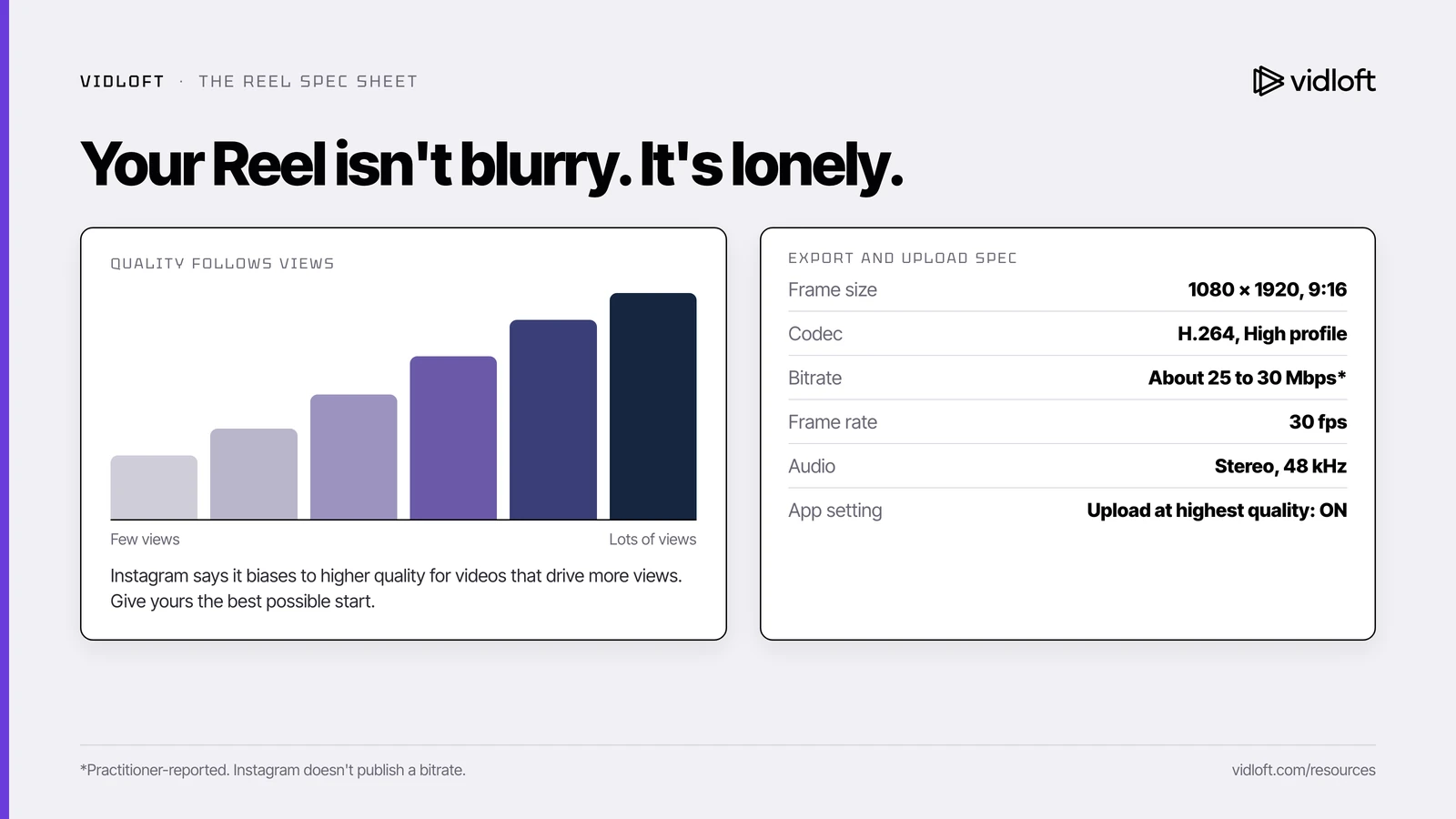
Instagram saves its sharper, costlier encoding for accounts and videos that drive more views, so a quiet brand account starts at a disadvantage.
This isn't a theory from a frustrated editor. Instagram's head, Adam Mosseri, confirmed it in an Instagram Q&A in October 2024. Instagram tries to show the best version it can, he said, but a video that stops getting watched gets moved to a lower-quality version. Coverage at the time reported the flip side too: a video that gets watched a lot again gets re-rendered at higher quality.
In a follow-up post on Threads, Mosseri spelled out the economics. Sharper encoding burns more computing power and bigger files cost more to store, so Instagram will "bias to higher quality" for "creators who drive more views." He called it a sliding scale, not an on/off switch, and said it works on the account's overall audience rather than per viewer.
So what? Think of a hotel that saves its best rooms for frequent guests.
Your brand account, with a few thousand followers who mostly work for you, is at the front desk with no status.
To be fair, Mosseri also said the difference isn't large and that content matters far more to viewers than resolution. We believe him. But that's the one piece you can't control. The rest of the softness usually comes from things you can: the wrong export, a setting nobody turned on, and a file squeezed twice before Instagram touched it.
The Reel export and upload spec sheet
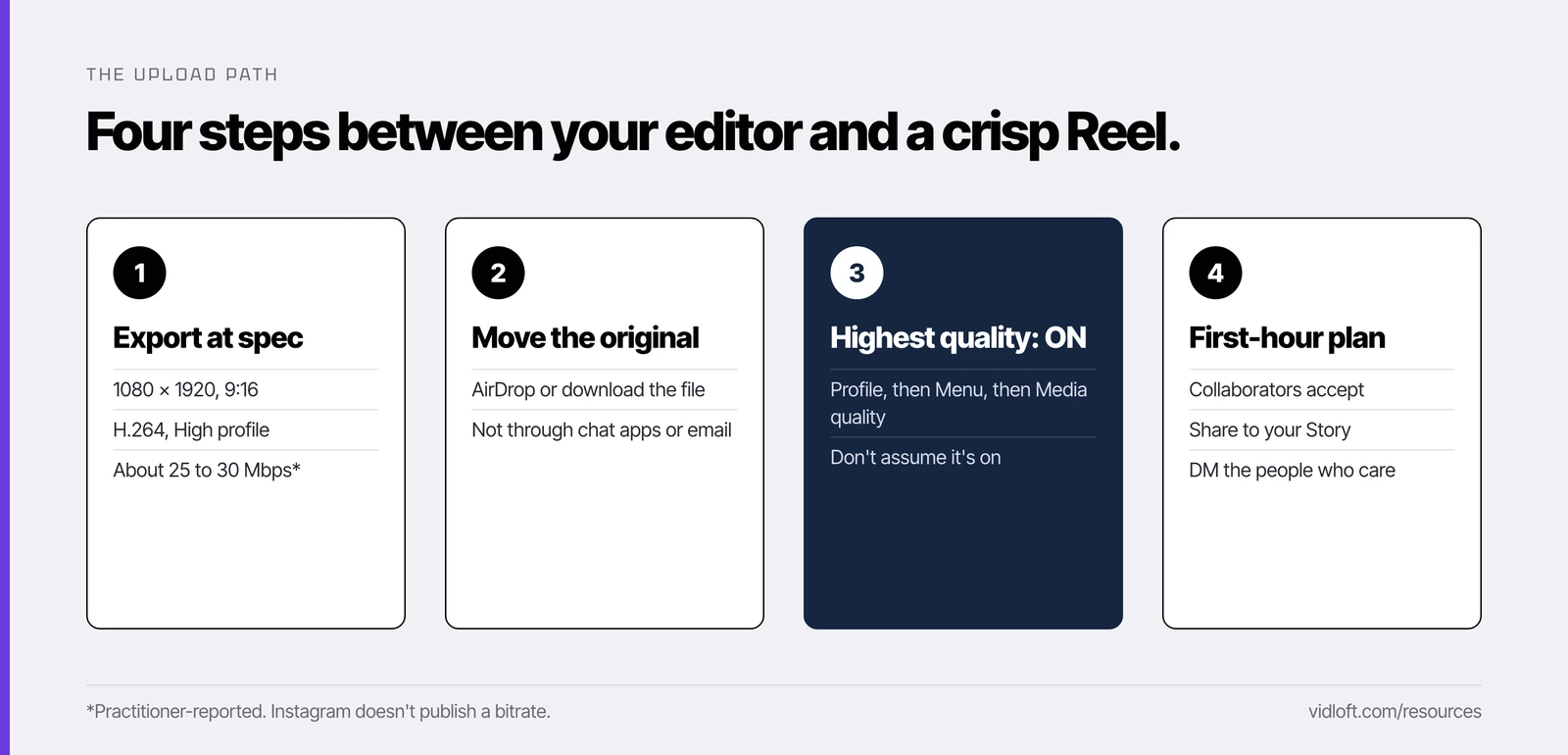
Give Instagram a clean 1080x1920 H.264 file, turn on "Upload at highest quality," and get the file onto the posting phone without any app shrinking it first.
Instagram publishes its minimums and a short list of technical details in its Help Center. It doesn't publish a target bitrate, so for that one row we're going on what practitioners report. We read thousands of threads where marketers trade notes on what they've actually tested, and the 25 to 30 Mbps range keeps coming up.
| Setting | Use this | Why |
|---|---|---|
| Frame size | 1080 x 1920, 9:16 vertical | Instagram accepts 1.91:1 to 9:16. Only 9:16 fills the screen. |
| Codec | H.264, High profile, MP4 | Instagram's technical details list High profile, CABAC and 4:2:0 color. |
| Bitrate | About 25 to 30 Mbps | Practitioner-reported. Enough to hold detail without handing Instagram a giant file to crush. |
| Frame rate | 30 fps, or 60 if it was shot at 60 | Instagram's stated minimum is 30 fps. |
| Scan and keyframes | Progressive, closed GOP, a keyframe every half second | Instagram asks for a GOP of half the frame rate (15 frames at 30 fps). |
| Audio | Stereo, 48 kHz | Instagram's listed audio spec. |
| Cover image | 420 x 654 px, JPG or PNG | Instagram's recommended size. You can't change it after posting. |
| App setting | "Upload at highest quality" ON | Profile, then Menu, then Media quality. Don't assume it's on. |
| Getting it to the phone | AirDrop, or download the original file | Chat apps, email and some schedulers re-compress video. |
What about 4K? Bigger isn't automatically better. Teams often report that a giant 4K master pushed through the regular Instagram app comes out no sharper than a clean 1080p file, because Instagram re-encodes it either way.
The exception is Edits, Instagram's own editing app. Instagram's creator team says Reels shared straight from Edits get priority processing so they look their best from the first view, and recommends exporting there at 2K, HDR and 60 fps. One brand's agency reported that posting through Edits is what finally fixed its soft Reels. Still rough after everything above? Import the finished file into Edits and share from there.
The 7-point pre-upload checklist (forward this to your agency)
Most blurry Reels are decided before anyone taps Share, so run these seven checks first.
Copy this list into an email to whoever edits your video and ask them to confirm each line.
- Delivered at 1080 x 1920, 9:16, H.264 MP4, around 25 to 30 Mbps. Not a 4K master. Not a web preset nobody has checked since 2019.
- 30 fps or higher, progressive, stereo audio at 48 kHz. Instagram's listed requirements.
- Text, logos and faces clear of the edges. Instagram's buttons and caption sit over the bottom and right side. Keep anything important in the middle.
- A cover frame at 420 x 654, chosen on purpose. It's permanent.
- The file travels clean. AirDrop it, or download the original to the posting phone. No chat apps or email. Using a scheduler? Test one post side by side with a direct upload first.
- "Upload at highest quality" is on, on the phone that's actually posting. Including the CEO's.
- Each account gets its own opening, or it's one Collab post. More on that next.
Stop posting the identical file to five accounts
The same file on several linked accounts reportedly gets throttled, so post it once as a Collab or give each account its own opening.
Big companies love this move. The brand account posts the Reel. Then the CEO. Then Germany, Texas and the careers page. Same file, same caption, same afternoon.
We've seen teams report that the copies get a fraction of the original's reach. Instagram hasn't published a rule about linked corporate accounts, but the direction is clear. Its ranking has favored original content over reposts since 2022, and its Help Center warns that a trial reel can get limited reach if Instagram detects you've already shared the same content.
Two fixes:
- One Collab post. Post the Reel once and invite the other accounts as collaborators. It appears on each profile, and the views, likes and comments land on one post instead of being split five ways. Use this when the message is identical.
- A different opening per account. Change the first two or three seconds. The CEO opens with a line to camera, the regional page on the local plant, the careers page on a new hire. New caption and cover, same core video underneath.
Test your hook on strangers with Trial Reels
Trial Reels show a Reel only to people who don't follow you, which is the honest test most brand accounts never get.
Here's the quiet problem with corporate Instagram. The followers are employees, retirees, a few vendors and somebody's mom. They like everything. That tells you nothing about whether a stranger will stop scrolling.
Trial Reels fix that. Per Instagram's Help Center, a trial reel goes to accounts that don't follow you, stays off your followers' feeds and your profile grid, and shows views, likes, comments and shares within 24 hours. If it performs, share it to everyone (or let a setting do that automatically). Trials are ranked separately, so a dud won't drag down your regular Reels. You need a public professional account with at least 200 followers.
How to run it:
- Cut two or three different openings of the same video.
- Post each as a new Reel with Trial turned on. Instagram says trials should be new content, so never reuse a posted file.
- After 24 hours, see which one strangers actually watched.
- Share the winner to everyone.
It's a rough hook test, and it's free.
The first-hour plan
Most views come early, and views are what earn better encoding, so treat the first hour like a launch.
Mosseri said the vast majority of a video's views come at the beginning. So plan them.
| When | What happens | Who owns it |
|---|---|---|
| Day before | File checked against the spec sheet. Collab invites, caption, cover and openings approved. | Content lead |
| 10 minutes before | "Upload at highest quality" on, strong Wi-Fi, original file on the phone. | Whoever posts |
| 0:00 | Post when Insights says your followers are most active. Add collaborators. | Whoever posts |
| 0:05 | Collaborators accept the invite. The brand account shares the Reel to its Story. | Each account owner |
| 0:10 to 0:30 | DM it to the people who truly care: the customer in the video, the partner, the crew. Ask them to watch, not to "like for the algorithm." | Content lead |
| 0:00 to 1:00 | Reply to every comment. | Social manager |
| Next day | Watch it on a different phone over cellular, the way a stranger would. | Anyone |
If it looks soft, fix the spec next time. Don't delete and re-post the same file, which just puts a duplicate in front of the same system. And yes, ask employees to watch. Just don't mistake their likes for proof the hook works.
One myth to skip: "Android uploads look worse than iPhone." You'll hear it, and you'll hear the opposite. We found nothing from Instagram backing either, and the tests people share disagree. Fix the file and the setting before you buy anyone a new phone.
The take
Instagram won't hand a quiet brand account its premium encode out of kindness. It hands it to accounts people watch. You can't skip the line. You can stop losing quality before Instagram touches the file, test hooks on strangers instead of coworkers, and run a real first hour.
Whoever finishes your videos (an agency, a freelancer, or our editors at Vidloft) should be able to hit every line of that spec sheet without a second email. If you're weighing who that should be, here's how managed video compares to an agency.
Frequently asked questions
Why do my Instagram Reels look blurry after I upload them?
Instagram re-encodes every upload and gives its higher-quality encoding to accounts and videos that draw more views. A wrong export, the "Upload at highest quality" setting being off, or a file compressed by another app first makes it worse.
What are the best export settings for Instagram Reels?
Export 1080x1920 vertical, H.264 High profile MP4, 30 fps or higher, with stereo 48 kHz audio. Instagram doesn't publish a bitrate, but practitioners report good results around 25 to 30 Mbps.
Does Instagram lower the quality of videos with few views?
Yes. Adam Mosseri confirmed in October 2024 that Instagram biases higher-quality encoding toward creators who drive more views and moves videos that stop being watched to a lower-quality version, though he said the difference isn't large.
Should our brand, CEO and regional accounts all post the same Reel?
Post it once as a Collab with the other accounts as collaborators, or give each account its own opening, caption and cover. Identical copies across linked accounts reportedly get much less reach.
Can a corporate account use Instagram Trial Reels?
Yes, if it's a public professional account with at least 200 followers. Trial Reels go only to non-followers first and show results within 24 hours, so you can test a hook on strangers before your followers see it.
Stop Editing.
Start Scaling.
Your content backlog is a goldmine.
Let us help you mine it.